Nadia Khalil · Guide
It’s 11pm. Someone is on your store with a card in their hand, wanting to know one thing: do you ship to Ireland?
The answer is on your site. It’s in paragraph four of your shipping page. They type “ireland” into your search box, get eleven blog posts that happen to mention Ireland, and close the tab.
You didn’t lose that sale to a competitor. You lost it to your own search bar.
The Sideconvo Voice, Chat & Search Agent plugin fixes the specific thing that went wrong there. It takes the content you already have — posts, pages, products, taxonomy terms, PDFs — and puts two things on top of it: an AI agent your visitors can ask questions in plain language, by typing or by speaking, and a semantic replacement for WordPress’s keyword search.
No chatbot scripts to write. No parallel FAQ database to keep in sync with your real content. No developer.
Get the plugin on WordPress.org →
How it actually works
Install the plugin, connect your Sideconvo account, and choose which content types are in scope. Your selected content is indexed into a vector database — built for meaning rather than keyword matching.
From then on, a visitor asks “do you ship to Ireland?” and gets the sentence from your shipping page, phrased as an answer, with a link to where it came from. They can type it or tap the mic and say it.
Voice matters more than it sounds like it should. On a phone, speaking a question beats thumbing it into a search box every time, and for visitors using assistive technology it’s often the only comfortable route in. Both modes work out of the box; voice availability depends on your plan.
It replaces your search bar, and fails safely
Turn on Search Integration and your existing WordPress search results come from Sideconvo’s vector backend instead of the default keyword query. Someone searching “refund policy” lands on your returns page even if the word “refund” appears nowhere on it.
Two things a cautious site owner asks first, answered:
- Results are cached in two layers — WordPress object cache plus transients, with a TTL you set in Settings. Repeat queries don’t cost you an API call.
- If the Sideconvo API is slow or unreachable, search hands back to native WordPress automatically. Your visitors get ordinary keyword results rather than an error page.
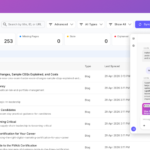
Before switching it on for real traffic, the Search Playground in wp-admin shows exactly what any query will return — ranked, with thumbnails and excerpts.
It stays current without you
This isn’t a one-time import. The plugin hooks into WordPress and reacts as you work:
- Publish or update a post → queued for sync
- Trash or delete one → removed from the index
- Schedule a post → indexed the moment WordPress publishes it
- Edit a category description → the term is re-synced
For a site that publishes weekly, that’s the whole difference between an agent that sounds informed and one that confidently quotes a price you changed in March.
When something does drift, the Sync screen tells you what’s missing, stale, or orphaned, and fixes each case in one click.
You decide what it knows
Not everything on your site belongs in an AI’s knowledge base — thin tag archives, an old landing page you keep alive for a redirect, the terms page nobody needs read aloud.
A setup wizard lets you pick the post types and taxonomies in scope. Every individual post and page then gets a Sideconvo box in the editor where you can exclude it, or set an expiry date so a limited-time promotion drops out of the index by itself instead of haunting your agent in February.
Multilingual sites are handled per language: with WPML and Polylang, each translation is its own WordPress post and is indexed independently, with per-language item counts on the Content Types screen.
Your knowledge base isn’t limited to posts either. Upload manuals, brochures, and course materials under PDFs & Knowledge and Presentations, and the agent answers from those too.
Add a button, start a conversation
The plugin ships a Sideconvo Button block for the block editor, and the same button as an Elementor widget for page-builder sites.
Drop it in a hero section, a sidebar, or as a floating button that follows visitors down the page. Set it to chat or voice mode, pre-load an opening message to steer the conversation toward what you actually sell, or have it open automatically on key pages. Animated gradients, rotating text prompts, dark mode, custom icons — all configured in the editor panel, and it respects prefers-reduced-motion for visitors who’ve asked their OS to calm things down.
See everything the Sideconvo Button can do →
Try it before your visitors do
The Agent Playground lives in wp-admin. Ask it the ten questions your support inbox gets every week and read what comes back. Wherever it hedges or gets something wrong, you’ve found a gap in your own content — useful information whether or not you keep the plugin.
Once you’re live, Conversations shows what visitors actually asked. That’s usually a more honest picture of your site’s weak spots than any analytics dashboard will give you.
What leaves your site, and what it costs
Worth being straight about, because it’s the part that matters.
When the plugin syncs an item, it sends Sideconvo the post or term ID, title, URL, body content as HTML, featured image URL, last-modified timestamp, and your site’s namespace. Content you haven’t selected is never sent, and nothing at all is transmitted until you connect a valid account. Indexing and AI processing happen on Sideconvo’s servers, over HTTPS, and your API key stays server-side — never exposed to the browser or to visitors.
One responsibility stays with you: if you operate under GDPR, CCPA, or similar, you should tell your visitors that your content is indexed by an AI platform and reference Sideconvo’s privacy policy in your own privacy documentation.
The plugin is free on the WordPress Plugin Directory and there’s a free plan to start on. Some features — voice among them — depend on your plan; locked features show a padlock with an upgrade path, and billing lives inside wp-admin rather than in a second dashboard you have to learn. See plans →
Who this is for
Any site where visitors regularly need to find one specific fact:
- Shops — shipping, sizing, and returns answered without the visitor leaving the page
- Course platforms — curriculum, prerequisites, and pricing questions from prospective students
- Service businesses — the same six pre-sales questions, handled at 2am
- Documentation sites — natural-language queries instead of rigid keyword search
- Publishers — readers who want the one article you wrote about this in 2019
- Agencies — deploy across client sites and hand over something that visibly works
Get started
Download the Sideconvo plugin on WordPress.org →
Then follow the setup guide to get your content indexed and your agent live: How to Set Up and Use the Sideconvo WordPress Plugin →
Your content is already written. This is what gives it a voice.