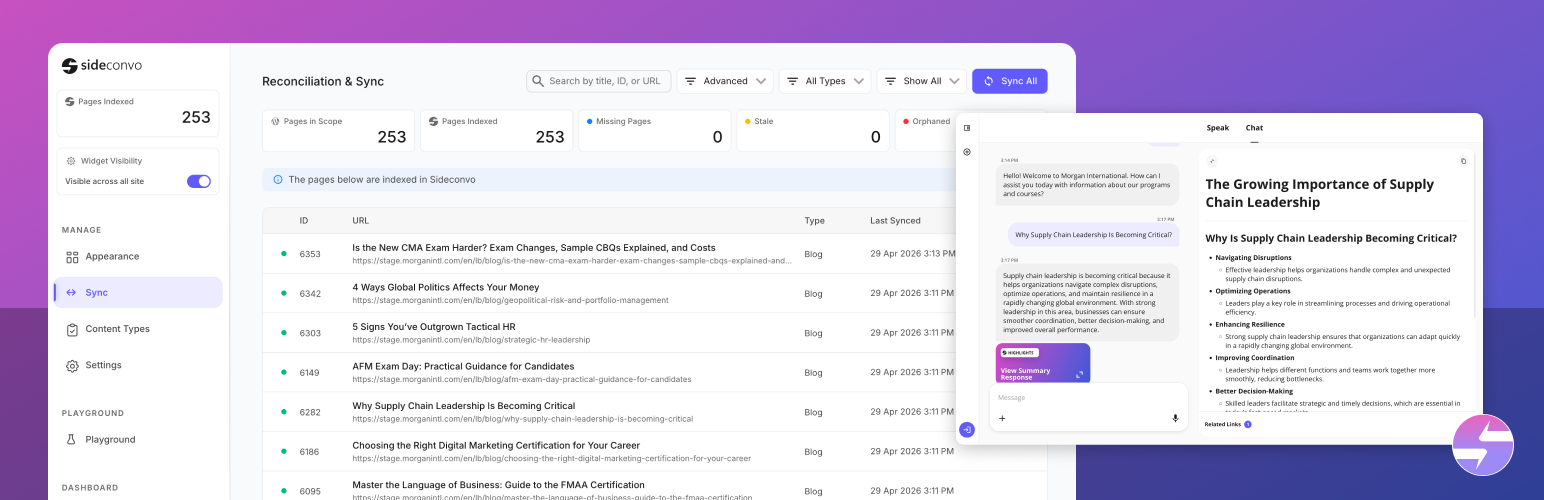
An AI chatbot for your website is an assistant that answers visitors’ questions in plain language, using what’s on your site. Done well, it’s like having someone who has read every page you’ve ever published, available at 3am, in every language your visitors speak.
Done badly, it’s a pop-up that gets in the way and makes things up.
This guide covers what a website AI chatbot does, what it costs, how to tell a good one from a bad one, and how to add one in a few minutes.
What an AI chatbot does on a website
Visitors type (or say) a question, such as “Do you deliver on Saturdays?”, “Which plan includes SSO?” or “Is this safe for sensitive skin?”, and get a direct answer from your content, usually with a link to the page it came from.
Under the hood, a modern AI chatbot:
- Reads your website. It crawls your pages (usually from your sitemap) and any documents you upload.
- Stores that content so it can find the relevant passages for any question.
- Writes an answer using a large language model, grounded in those passages.
- Follows your instructions: tone, topics to focus on, topics to avoid, and when to send people to a human.
That’s very different from the old scripted chatbots, which followed decision trees and broke the moment a visitor asked something unexpected.
What websites use it for
| Website type | Questions it answers |
|---|---|
| Online stores | Sizing, compatibility, shipping, returns, “where can I buy this?” |
| SaaS and B2B | Plans, features, integrations, security |
| Service businesses | Prices, availability, process, service areas |
| Publishers and blogs | Finding articles, summarising what you’ve written on a topic |
| Agencies | Services, process, past work, timelines |
| Membership and internal sites | Policies and documentation, for signed-in users only |
Chatbot, voice assistant or both?
A chatbot answers typed questions. A voice assistant lets visitors speak and hear the answer. On phones, speaking is often much faster than typing a long question. The best website assistants now do both, with one knowledge base behind them. More on this in AI voice agent vs chatbot.
What it costs
Website AI chatbots are priced in four main ways:
| Pricing model | How it works | Good when | Watch out |
|---|---|---|---|
| Flat per site | One monthly price per website | You want a predictable bill | Check fair-use limits |
| Per message or credit | You buy a monthly allowance of messages | Traffic is low or steady | Costs rise with traffic; top-ups |
| Per conversation | Billed per chat | Low volumes | Busy months cost more |
| Per resolution or outcome | Billed when the AI resolves a query | Large support teams | Monthly minimums; harder to predict |
For reference, Sideconvo is flat per site: $19.99 a month for chat only, or $49.99 a month for voice and chat. Comparison pages for Tidio, Chatbase and Intercom Fin list other tools’ current prices.
How to choose a website AI chatbot
- Does it answer only from your content? Ask it something your site doesn’t cover. A good chatbot says it doesn’t know, or points to a human. A bad one guesses.
- Does it show its sources? Links to the page an answer came from build trust and let visitors read more.
- Does it stay in sync? When you change a price or policy, how quickly does the chatbot know? Look for automatic syncing or scheduled re-crawls.
- Can you control it? Tone, focus topics, topics to avoid, contact options.
- Can you see what visitors ask? Conversation logs show what your site fails to explain, which is often the most valuable part.
- Does it support voice? If much of your traffic is mobile, voice is a real advantage.
- Does it install natively on your platform? A Shopify app or WordPress plugin is easier to install, and to remove, than code pasted into a theme.
- Is the pricing predictable at your traffic? Work out what a busy month would cost.
How to add an AI chatbot to your website
With Sideconvo, it takes about five minutes:
- Sign up and enter your website’s URL. It crawls your pages and builds its knowledge.
- Upload anything your pages don’t say, such as price lists, manuals or policies (PDF, Word or PowerPoint).
- Set its personality: tone, greeting, conversation starters, topics to avoid.
- Test it in the Playground with your ten most common customer questions.
- Install it:
- Shopify: install the app and switch it on in your Theme Editor. Step by step: how to add an AI chatbot to Shopify.
- WordPress: install the plugin.
- Webflow, Squarespace, Framer or any other site: paste one line of code into your site’s header. See the 5-minute setup guide.
Common mistakes
- Launching without testing. Ask it your hardest questions first.
- Thin content. If your shipping page is one vague sentence, the chatbot’s answers will be vague too. Fix the page.
- Hiding contact options. Give it your contact page, email or phone, so it can hand off gracefully.
- Never reading the conversations. The log tells you exactly which pages need work.
- Over-eager pop-ups. If you auto-open the assistant, do it once, not on every page. Sideconvo’s scroll-based auto-open triggers at most once every 8 hours per visitor.
Frequently asked questions
What is an AI chatbot for a website?
An assistant on your site that answers visitors’ questions in plain language, using your website’s content and documents, usually with links to the source pages.
How do I add an AI chatbot to my website?
Sign up for a no-code tool, enter your URL so it learns your pages, then paste one line of code into your site’s header, or install its Shopify app or WordPress plugin.
Do I need to train the chatbot myself?
Not with modern tools. Sideconvo learns from your existing pages automatically; you just add documents for anything your pages don’t cover.
How much does a website AI chatbot cost?
Anywhere from free tiers to hundreds of dollars a month, depending on the pricing model. Sideconvo is $19.99 a month for chat or $49.99 for voice and chat, per site.
Will an AI chatbot make things up?
Good ones are built to answer only from your content. Test any chatbot with questions your site doesn’t cover before going live.
Does it work in other languages?
Sideconvo replies in the visitor’s language.
Will it slow down my website?
Sideconvo’s script loads asynchronously, so your page doesn’t wait for it.
Add one in five minutes
Start a free trial, enter your website’s address, and ask it your customers’ questions.
Related: AI voice agent vs chatbot, the complete guide to AI shopping assistants, and AI chatbot for small business.